

Why the Best Autoresponder Plugin for WordPress Can Make or Break Your Email Strategy
The best autoresponder plugin for WordPress is not a single answer — it depends on your goals. But here are the top picks to get you oriented fast:
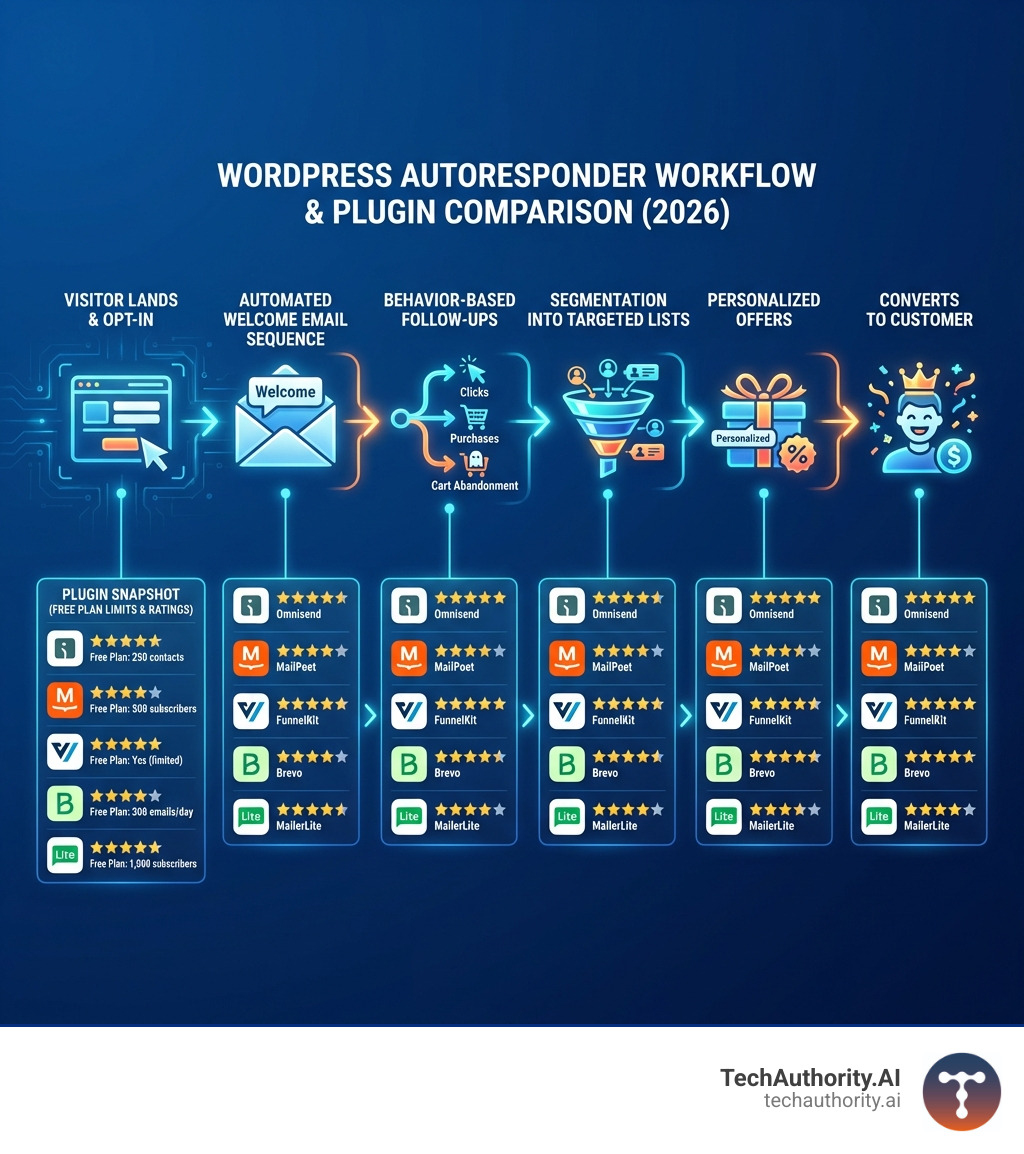
| Plugin | Best For | Free Plan | Starting Price |
|---|---|---|---|
| Omnisend | eCommerce stores | Yes (250 contacts) | $16/month |
| MailPoet | Beginners & bloggers | Yes (500 subscribers) | $11/month |
| FunnelKit Automations | Advanced WooCommerce funnels | Yes (limited) | $249.50/year |
| Brevo | Budget-conscious users | Yes (300 emails/day) | $9/month |
| MailerLite | Simple list building | Yes (1,000 subscribers) | $9/month |
WordPress does not come with a built-in autoresponder. That means every automated welcome email, abandoned cart reminder, and follow-up sequence you want to run requires a third-party plugin.
And that gap matters — a lot.
Email automation lets you engage subscribers at exactly the right moment, without doing it manually every time. Whether you're nurturing leads, recovering lost sales, or welcoming new readers, the right plugin handles it all in the background while you focus on growing your business.
The challenge? There are dozens of options out there, with very different strengths, price points, and learning curves. Picking the wrong one costs you time, money, and sometimes your hard-won email deliverability.
This guide cuts through the noise so you can choose with confidence.
I'm Randy Speckman, founder of a web design agency that has worked with over 500 entrepreneurs on websites, email campaigns, and digital marketing strategies — and finding the best autoresponder plugin for WordPress for each client's specific needs has been central to that work. In the sections ahead, I'll walk you through exactly what to look for and which tools consistently deliver results.
Introduction and Why Automation is Essential
In the world of digital marketing, time is our most precious resource. As business owners, we often find ourselves wearing too many hats, from content creator to customer support specialist. This is exactly where WordPress Autoresponder Plugins become our best friends.
An autoresponder is essentially a set-it-and-forget-it system. It allows us to create and schedule a sequence of emails that are automatically delivered to subscribers based on specific behavioral triggers. For example, when a new visitor signs up for our newsletter, they don't want to wait three days for a manual “hello.” They want that welcome discount or eBook now.
Beyond just being a “welcome wagon,” these plugins are vital for lead nurturing. Research shows that it often takes multiple touchpoints before a lead converts into a customer. Autoresponders handle these touchpoints by sending educational content, case studies, or limited-time offers over several days or weeks. This constant, relevant engagement is the secret sauce for conversion optimization.
By automating these interactions, we ensure that no lead falls through the cracks. Whether it's a “Happy Birthday” email with a coupon code or a nudge to finish a purchase, automation keeps our brand top-of-mind without us having to hit “send” every single time.
Key Features to Consider for Your Automation Strategy
Selecting the best autoresponder plugin for WordPress requires looking past the flashy marketing and focusing on the engine under the hood. Not all plugins are created equal, and the one we choose needs to align with our specific business model.
Drag-and-Drop Builders and Templates
Unless we’re secret coding wizards, we want a visual editor. Most top-tier plugins now offer drag-and-drop builders that let us see exactly how our emails will look on mobile and desktop. Pre-designed templates are also a huge time-saver, allowing us to maintain a professional brand image with minimal effort.
List Segmentation and Personalization
Sending the same email to everyone is a quick way to get marked as spam. We need a tool that allows for deep list segmentation. This means we can group subscribers based on their interests, past purchases, or even how often they click our links. Personalization goes beyond just adding a “Hi [First Name]” tag; it’s about sending the right content to the right person at the right time.
Multi-Channel Marketing
While email is king, the engagement rate is much higher for SMS. Statistics show that roughly 90% of SMS messages are read within just three minutes of receipt. Some modern WordPress plugins now allow us to combine email and SMS into a single automated workflow, ensuring our most urgent messages (like flash sales) actually get seen.
A/B Testing and Analytics
We can't improve what we don't measure. The best plugins offer A/B testing (also known as split testing), which lets us send two versions of a subject line or email body to see which one performs better. Robust analytics should show us open rates, click-through rates, and most importantly, how much revenue each automated sequence is generating.
Deliverability and SMTP Integration
The most beautiful email in the world is useless if it ends up in the spam folder. Many WordPress sites struggle with email deliverability because the default PHP mail function is unreliable. We recommend looking for plugins that support SMTP integration. This routes our emails through professional delivery services, ensuring they actually land in the inbox.
Top-Rated Options for the Best Autoresponder Plugin for WordPress
The market is flooded with options, but a few names consistently rise to the top of the pile for their reliability and feature sets. Let's look at the heavy hitters.
Omnisend: Best for eCommerce Stores
If we are running an online shop, Omnisend is a powerhouse. It is specifically built for eCommerce, meaning it talks to our store data in real-time. We can set up sophisticated triggers based on what customers are doing—or not doing.
For instance, the Omnisend for WordPress plugin allows us to recover abandoned carts with ease. It doesn't just send one email; it can trigger a multi-channel sequence of emails and SMS messages to bring that customer back. With a 4.9/5 rating on WordPress.org, it’s a favorite for those focused on ROI.
MailPoet: The Best Autoresponder Plugin for WordPress Beginners
For those who want to stay entirely within the WordPress dashboard, MailPoet is the gold standard. It’s incredibly user-friendly and doesn't require us to log into a separate website to manage our lists.
MailPoet is perfect for bloggers and small businesses. It offers beautiful newsletter templates and handles the “heavy lifting” of sending emails through its own dedicated service. Plus, it’s built with GDPR compliance in mind, offering easy double opt-in features to keep our lists clean and legal.
FunnelKit Automations: Advanced Marketing Funnels
Formerly known as Autonami, FunnelKit Automations is designed for the “power user.” If we want to build complex customer journeys with visual workflows, this is the tool. It integrates natively with WooCommerce and allows us to create trigger-based sequences that feel almost human.
Want to send a specific discount only to customers who have spent over $500? FunnelKit can do that. Want to tag a user when they finish an online course and then send them a certificate? FunnelKit handles it. It’s a “must-have” for anyone serious about high-level marketing funnels.
How to Effectively Set Up and Utilize Your Plugin
Once we've picked our plugin, the setup phase is critical. A sloppy setup can lead to technical glitches or, worse, being blacklisted by email providers.
Step 1: API and SMTP Configuration
Most modern plugins connect to an external email service via an API key. This is safer and faster than traditional methods. Once connected, we strongly suggest configuring an SMTP service. Tools like WP Mail SMTP can bridge the gap between our site and professional mailers like Brevo or SendGrid, ensuring our automated messages don't get lost in digital limbo.
Step 2: Designing High-Converting Forms
We can't send autoresponders if we don't have subscribers. Use the plugin's form builder to create attractive opt-in forms. We should experiment with different placements:
- Exit-Intent Popups: Capture visitors just as they are about to leave.
- Slide-ins: Less intrusive but still very effective.
- In-content forms: Perfect for offering “content upgrades” like a PDF version of a blog post.
Step 3: Implementing Double Opt-In
While it adds an extra step for the user, a double opt-in (where the user must click a link in an email to confirm their subscription) is vital for list hygiene. It filters out bots and fake email addresses, ensuring our engagement rates stay high and our sender reputation stays healthy.
Step 4: Personalization and Performance Tracking
Don't just set it and forget it forever. We should check our performance tracking dashboard at least once a month. Are people opening the third email in our sequence? If not, the subject line might need a tweak. Use the data to refine our strategy. The best autoresponder plugin for WordPress is the one we actually use to its full potential!
Frequently Asked Questions about WordPress Autoresponders
Does WordPress have a built-in autoresponder?
No, the core WordPress software does not include built-in autoresponder functionality. While WordPress can send basic transactional emails (like password resets), it lacks the infrastructure to manage subscriber lists, design marketing emails, or schedule automated sequences. You must use third-party plugins to fill these automation gaps.
What is the best autoresponder plugin for WordPress for free?
If we are on a tight budget, there are several excellent free tiers available:
- Brevo: Offers unlimited contacts and allows us to send up to 300 emails per day for free.
- MailerLite: A very popular choice that allows for up to 1,000 subscribers and 12,000 emails per month on their free plan.
- MailPoet: Their free “Premium with Sending” plan supports up to 500 subscribers with full feature access.
How do I ensure high email deliverability?
Deliverability is the “make or break” factor. To keep our emails out of the spam folder:
- Use an SMTP Service: Don't rely on your web host's server. Use a dedicated provider.
- Authentication: Ensure your SPF, DKIM, and DMARC records are correctly set up (most plugins guide you through this).
- Clean Your List: Regularly remove “cold” subscribers who haven't opened an email in six months.
- Avoid “Spammy” Words: Avoid overusing all-caps, excessive exclamation points, or words like “FREE” and “CASH” in your subject lines.
Conclusion
Finding the best autoresponder plugin for WordPress is one of the smartest investments we can make for our business. It’s about more than just sending emails; it’s about building a scalable system that nurtures relationships and drives revenue around the clock.
Whether we choose the eCommerce power of Omnisend, the beginner-friendly simplicity of MailPoet, or the advanced funnel capabilities of FunnelKit, the goal remains the same: to provide value to our audience automatically.
At TechAuthority.AI, we believe that strategic implementation is the key to business growth. Don't let your leads go cold. Pick a tool, set up your first welcome sequence, and start seeing the ROI of automation today. Master your marketing with WordPress Autoresponder Plugins and take your digital strategy to the next level.