

Why WordPress Marketing Automation Plugins Transform Your Business
WordPress marketing automation plugins are tools that handle repetitive marketing tasks automatically—like sending welcome emails, tagging leads, or recovering abandoned carts—so you can focus on growing your business instead of managing endless manual processes.
Top WordPress Marketing Automation Plugins:
- A self-hosted CRM that offers unlimited contacts and flows, potentially saving businesses significant monthly fees.
- An all-in-one email marketing plugin for managing automation directly within WordPress.
- A no-code workflow builder that connects hundreds of different plugins.
- An e-commerce automation tool with advanced features like abandoned cart recovery.
- An integration plugin that syncs WordPress data with dozens of external CRMs.
- An email marketing service with a generous free plan for new businesses.
- An advanced form builder combined with a workflow extension for automating business processes.
If you've ever spent hours manually sending follow-up emails, updating contact lists, or tracking customer actions across multiple tools, you understand the pain. Industry reports show that 76% of businesses now use automation for standardizing daily workflows—and WordPress site owners have access to some of the most powerful automation tools available. The difference between a struggling freelancer and a thriving agency often comes down to how effectively they automate repetitive tasks.
I'm Randy Speckman, founder of Randy Speckman Design, where I've helped over 500 entrepreneurs implement wordpress marketing automation plugins to streamline their marketing and boost conversions. After designing thousands of websites and marketing campaigns, I've seen how the right automation setup can transform a business overnight.
Glossary for wordpress marketing automation plugins:
Why Your WordPress Site Needs Marketing Automation
In today's digital landscape, efficiency isn't just a buzzword; it's a necessity. For any business operating a WordPress website, marketing automation isn't a luxury—it's a strategic imperative. We're talking about leveraging smart tools to handle the grunt work, freeing us up for higher-level strategy and creative endeavors.
Here’s why embracing wordpress marketing automation plugins is crucial for your site's success:
- Increased Efficiency: Imagine a world where welcome emails send themselves, abandoned carts get follow-ups without you lifting a finger, and leads are automatically scored and assigned. This isn't a dream; it's the reality with automation. By streamlining these repetitive tasks, we drastically reduce manual effort and operational costs, boosting our overall Productivity.
- Improved Personalization: Generic messages are a thing of the past. Automation allows us to segment our audience based on their behavior, interests, and demographics, delivering highly personalized content and offers. This makes our communications far more relevant and impactful, fostering stronger customer relationships.
- Better Lead Nurturing: From the moment a visitor lands on our site or fills out a form, automation can guide them through a custom journey. We can send targeted content, educational materials, and special offers that move them closer to becoming a customer. This consistent, personalized engagement is key to effective Lead Generation Strategies.
- Data-Driven Insights: Marketing automation tools aren't just about doing tasks; they're about understanding performance. They provide invaluable data on campaign effectiveness, customer behavior, and conversion rates. This allows us to continuously refine our strategies, making smarter, data-backed decisions.
- Improved Customer Retention: Automation extends beyond the initial sale. We can set up automated post-purchase sequences, loyalty programs, and re-engagement campaigns that keep customers coming back. Building lasting relationships through consistent, valuable communication is a cornerstone of long-term success.
- Scalability for WordPress Small Businesses Complete Guide: As your business grows, so does your marketing workload. Automation ensures your marketing efforts can scale without requiring a proportional increase in manual labor or staff. This is especially vital for small businesses looking to compete with larger enterprises.
The statistics speak for themselves: industry reports show that 76% of businesses now use automation for standardizing daily workflows. If we're not automating, we're likely falling behind.
Opening up the Power of WordPress Marketing Automation with TechAuthority.AI
At TechAuthority.AI, we believe in empowering entrepreneurs and agencies to master WordPress and grow their online businesses. This section explores the most effective approaches and tools for automating your WordPress marketing, focusing on solutions, strategies, and best practices we recommend. We'll dig into powerful wordpress marketing automation plugins that can truly do the heavy lifting for you.
TechAuthority.AI’s Approach to WordPress Marketing Automation
Our philosophy at TechAuthority.AI centers on giving you control, flexibility, and tangible results. We advocate for solutions that not only automate but also empower you with data ownership and cost-effectiveness.

Many of the most powerful marketing automation solutions for WordPress are self-hosted. This means the software runs directly on your WordPress site, giving you complete control over your data. As we often say, it's crucial to Own your data rather than entrusting it entirely to third-party SaaS platforms. This approach often comes with significant cost-saving benefits; for instance, businesses that switch to self-hosted CRM solutions can save hundreds of dollars per month on CRM fees, amounting to thousands of dollars a year.
These self-hosted systems often boast unlimited contacts and flows, allowing your marketing efforts to scale without incurring increasing costs as your audience grows. They typically feature intuitive funnel and workflow builders, enabling us to design sophisticated Email Campaigns and customer journeys with ease. Furthermore, these robust plugins offer deep integrations with popular WordPress tools like WooCommerce for e-commerce and LearnDash for online courses, creating a seamless ecosystem for all your marketing needs.
For a deeper dive into these strategies and tools, we encourage you to explore our Official TechAuthority.AI Resources.
Email Marketing Automation for WordPress
Email remains one of the most effective marketing channels, and automation takes its power to the next level. With the right wordpress marketing automation plugins, we can build sophisticated email sequences that engage, nurture, and convert.
Some plugins offer an all-in-one email marketing and CRM solution directly within WordPress. This means we can manage our contacts, segment them, and send targeted emails without ever leaving our WordPress dashboard. These tools can provide 360° contact profiles, allowing us to see every interaction a user has had with our site. This rich data fuels better personalization and more effective campaigns, which we discuss in detail in our Email List Segmentation Strategies guide.
They also often come with a visual automation builder, making it easy to create complex customer journeys based on user actions, purchases, or course enrollments. They integrate seamlessly with popular LMS and e-commerce plugins, ensuring a cohesive marketing strategy. If you're looking for a quick start, their getting started guides are incredibly helpful.
Other services offer generous free plans for those starting out, with paid plans that scale. These are often praised for their user-friendly interfaces and robust automation features, including RSS-to-email campaigns, which automatically send out new blog posts to your subscribers. Their integrations with other essential WordPress plugins like form builders and e-commerce platforms make them versatile tools for various marketing automation needs.
No-Code Automation Workflows
The beauty of modern wordpress marketing automation plugins is that they put powerful automation capabilities into the hands of anyone, regardless of coding experience. “No-code” solutions are revolutionizing how we build complex workflows.
Certain plugins are stellar examples of this. They act as bridges, allowing different plugins and apps on your WordPress site to “talk” to each other. The core concept is simple: a “trigger” event happens (e.g., a user submits a form, makes a purchase, or completes a course), and then an “action” is automatically performed (e.g., the user is added to an email list, receives a certificate, or gets a special discount).
These tools, sometimes hailed as the easiest and most powerful automation solutions for WordPress, can integrate with hundreds of different plugins and services. They allow us to create powerful, multi-step workflows without writing a single line of code. These tools allow us to create automations for both logged-in users and anonymous visitors, covering a vast array of use cases. For those needing to connect WordPress to thousands of external apps, dedicated connector plugins serve as a powerful bridge, extending your site's automation capabilities far beyond its borders.
We constantly share new ideas and guidance on how to leverage these tools. Be sure to Explore Automation Recipes to get inspired!
E-commerce Automation for WooCommerce
For any business running an online store with WooCommerce, automation is the secret sauce for boosting sales and improving customer experience. WordPress marketing automation plugins designed for e-commerce can turn browsing into buying and first-time customers into loyal fans.
One of the most impactful areas is abandoned cart recovery. Specialized plugins excel in this area. They allow us to set up advanced abandoned cart recovery campaigns that automatically send targeted emails to customers who left items in their cart, reminding them to complete their purchase. This can significantly improve your WooCommerce Conversion Rate Optimization.
Beyond abandoned carts, these plugins enable sophisticated post-purchase follow-up sequences. We can send thank-you emails, solicit reviews, recommend related products, or offer special discounts for future purchases. For example, some tools let us create dynamic coupons directly within WordPress, adding urgency and incentive. They also offer A/B testing for emails, ensuring our messages are always optimized for the best performance. To learn more about setting up these crucial campaigns, dive into guides on creating high-converting abandoned cart recovery sequences.
Many of these powerful e-commerce automations run on Action Scheduler, WordPress's robust background task system, ensuring reliability and scalability for our stores.
CRM & WordPress Integration
A Customer Relationship Management (CRM) system is the heart of any effective marketing strategy, especially for B2B or service-based businesses. Integrating a CRM directly with WordPress or using a native WordPress CRM solution is a game-changer.
Integration plugins are masters of integration, connecting our WordPress site with dozens of different CRMs, including popular platforms. This allows for seamless two-way data synchronization, meaning user data from WordPress (like form submissions, purchases, or course enrollments) can be sent to our CRM, and data from the CRM can influence what happens on our WordPress site. This also enables advanced features like tag-based content restriction, where access to specific content is granted or revoked based on tags applied in the CRM. The flexibility of Custom field mapping ensures all our valuable data is synchronized correctly. You can find more detailed guidance on this in our CRM Integration with WordPress resource.
Alternatively, for those who prefer an all-in-one, self-hosted solution, some plugins offer a comprehensive WordPress CRM. It provides contact management, automated email sequences, and funnel creation capabilities directly within the WordPress dashboard. This means we can manage our customer relationships and marketing automation without relying on external platforms, offering immense control and cost savings. These solutions integrate deeply with other WordPress plugins, like WooCommerce and LearnDash, creating a unified marketing ecosystem.
How to Choose the Right Automation Solution for Your Business
Choosing the perfect wordpress marketing automation plugins can feel like navigating a maze. With so many options available, have a clear strategy. Here's our checklist to help you make an informed decision:
Assess Your Primary Goals: What do you want to achieve with automation?
- E-commerce: Are you focused on abandoned carts, product recommendations, or post-purchase follow-ups?
- Lead Generation: Do you need advanced forms, lead scoring, or nurturing sequences?
- Online Courses/Memberships: Is course enrollment automation, content dripping, or membership management your priority?
- Email Marketing: Are you primarily looking for sophisticated email sequences, segmentation, and broadcasts? Clearly defining your goals will narrow down your options significantly.
Budget Considerations: Marketing automation tools come in all price ranges.
- Free vs. Premium: Many plugins offer free versions with basic features, which are great for starting out. Premium versions open up advanced functionalities, integrations, and support.
- Subscription vs. One-time Purchase: Consider if you prefer yearly subscriptions or one-time license fees, and whether you're comfortable with usage-based pricing models (e.g., per contact or email sent). Self-hosted solutions can save you thousands annually compared to some SaaS platforms. For hosting, explore options like Cheap Managed WordPress Hosting to keep overall costs down.
Ease of Use: Your technical comfort level is a significant factor.
- Visual Builder vs. Technical Configuration: Do you prefer intuitive drag-and-drop visual builders (like those in many modern automation tools) or are you comfortable with more technical configurations and potentially custom code? The goal is to set up automations without a headache.
Integration Needs: Your automation solution won't exist in a vacuum.
- Existing Tools: Does it integrate seamlessly with your current CRM, form builders, e-commerce platforms, or learning management systems (LMS)? A lack of integration can create new manual tasks.
- External Services: Do you need to connect to external services like Google Sheets, Slack, or other marketing platforms? Specialized connector plugins excel here.
Self-Hosted vs. Cloud-Based: This impacts data ownership and control.
- Self-hosted (WordPress-native): Self-hosted solutions keep all your data on your server, offering maximum control and often unlimited usage for a flat fee.
- Cloud-based (integrated): Cloud-based services integrate with WordPress via plugins but host your data externally. This can simplify setup but means less direct control over your data.
For a comprehensive guide on making smart software investments, consult our Software Buyers Guide. Taking the time to evaluate these factors will ensure you choose a solution that genuinely supports your business growth rather than adding complexity.
Putting Automation into Action: Practical Examples & Use Cases
Now that we understand the “why” and “how to choose,” let's dive into some tangible examples of how wordpress marketing automation plugins can revolutionize your operations. These real-world use cases are where the magic truly happens, freeing up our time and boosting our bottom line.
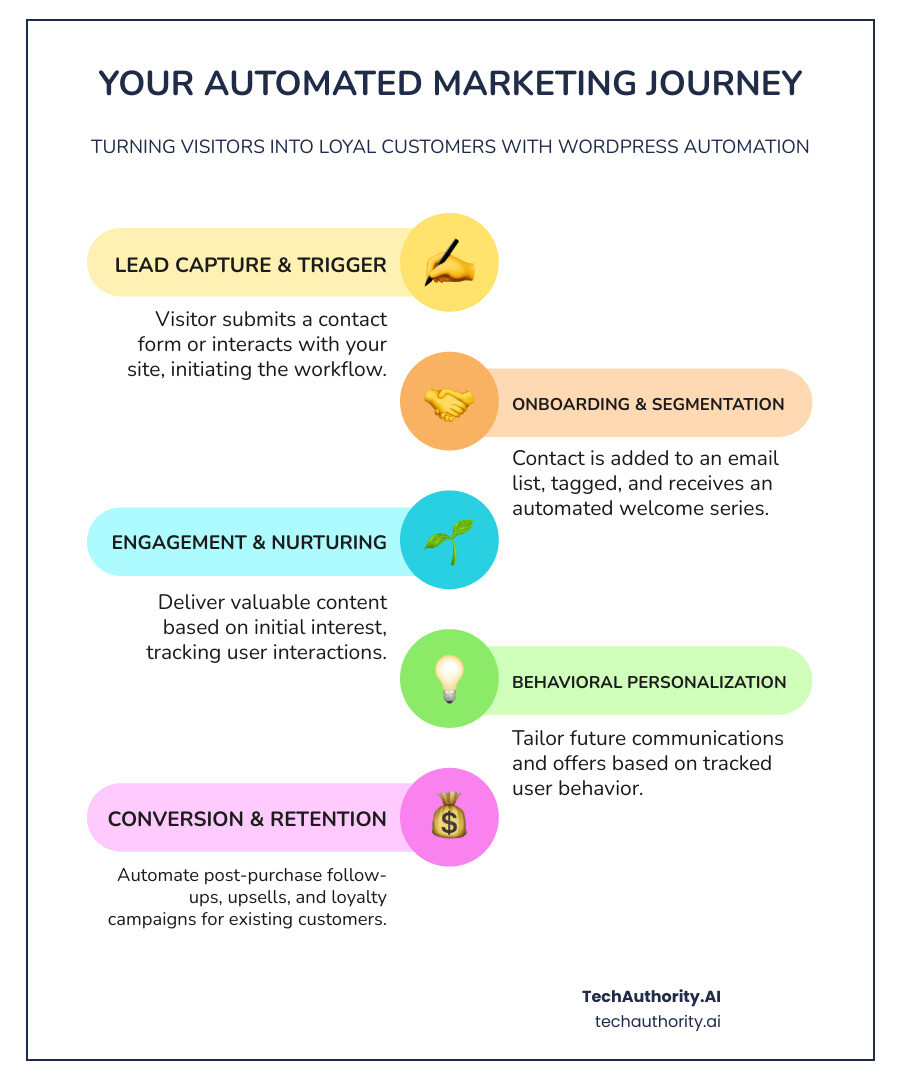
- Welcome Email Series: When a new user signs up for your newsletter or creates an account, an automated welcome series can introduce them to your brand, offer valuable content, and guide them towards their first purchase. This is a classic example of Automated Follow-up Emails.
- Abandoned Cart Reminders: For e-commerce sites, this is a goldmine. If a customer adds items to their cart but doesn't complete the purchase, an automated email (or series) can remind them of their cart, offer a discount, or address common objections.
- Course Enrollment Sequences: If you sell online courses, automation can enroll students, send welcome messages, provide access details, and even drip-feed content over time.
- Post-Purchase Upsells/Cross-sells: After a customer buys a product, automation can recommend complementary items or offer an upgrade based on their purchase history, driving additional revenue and increasing customer lifetime value through smart Sales Funnels.
- Lead Nurturing for Specific Content: If a visitor downloads a specific ebook or views a particular service page multiple times, automation can trigger a sequence of emails providing more information on that topic, positioning you as an expert and nurturing them towards a consultation or sale.
- Membership Renewal Reminders: For membership sites, automated emails can remind members about upcoming renewals, offer incentives to stay, and provide instructions for managing their subscription.
Essential Steps to Implement WordPress Marketing Automation
Ready to roll up your sleeves and get started? Implementing wordpress marketing automation plugins doesn't have to be daunting. Follow these essential steps for a smooth rollout:
- Install and Activate Your Chosen Solution: First things first, get your chosen plugin installed on your WordPress site. This typically involves searching for it in the WordPress plugin directory or uploading the plugin file.
- Configure Basic Settings: Once activated, dive into the plugin's settings. This usually involves connecting it to your email service provider (if it's not an all-in-one solution), setting up API keys for integrations, and defining global preferences. Understanding the plugin's architecture is key, which you can learn more about in our WordPress Plugin Development Complete Guide.
- Create Your First Automation “Recipe” or “Funnel”: Start simple! Don't try to automate everything at once. Pick one high-impact workflow, like a welcome email series for new subscribers. Use the visual builder (if available) to define your trigger (e.g., “new subscriber”) and your actions (e.g., “send welcome email 1,” “wait 2 days,” “send welcome email 2”).
- Test the Workflow with a Sample User: This step is crucial. Before going live, run through your automation as if you were a new user. Ensure emails send, tags are applied, and all steps execute as expected. You might even create a dummy user account for testing.
- Monitor Analytics and Optimize for Performance: Once your automation is live, don't set it and forget it. Regularly check the analytics provided by your plugin (open rates, click-through rates, conversions). Use this data to identify areas for improvement and tweak your workflows for better results.
- Plan for Launch: As part of your overall strategy, ensure your automation efforts align with your broader website goals. Our WordPress Website Launch Checklist can help you tie everything together for a successful rollout.
The Future of Automation in WordPress
The world of digital marketing is constantly evolving, and wordpress marketing automation plugins are at the forefront of this change. We're seeing exciting trends that promise even more intelligent, personalized, and efficient marketing efforts.
- AI-Powered Content and Email Generation: Artificial intelligence is already making waves. We anticipate deeper integrations where AI assists in writing compelling email copy, generating personalized subject lines, and even suggesting content for automated sequences. Our AI Tools for WordPress Developers Guide explores how AI is reshaping various aspects of WordPress.
- Hyper-Personalization Based on User Behavior: Beyond basic segmentation, the future points to real-time, dynamic content adaptation. Imagine a website that changes its headlines, offers, and even product displays based on a visitor's exact browsing history, previous purchases, and inferred intent—all powered by automation. Some plugins are already leading the way in dynamic content personalization.
- Deeper Integration with Headless WordPress Setups: As WordPress continues its evolution, particularly with headless architectures, we'll see automation plugins adapting to work seamlessly across decoupled frontends. This will open up new possibilities for delivering personalized experiences across various platforms, not just the traditional WordPress site.
- Increased Focus on Privacy and First-Party Data: With growing privacy concerns and regulations, the emphasis will be on leveraging first-party data (data collected directly from our audience) to drive automation. Solutions that enable robust, privacy-compliant data collection and utilization within WordPress will become even more critical. Our guide on GDPR Compliance for WordPress is a must-read for staying ahead. Server-side tracking is gaining traction for its ability to improve data accuracy while respecting user privacy.
These advancements mean our wordpress marketing automation plugins will become even smarter, more intuitive, and more integral to our success, allowing us to deliver truly exceptional customer experiences with less manual effort.
Conclusion: Put Your Marketing on Autopilot
We've journeyed through the incredible world of wordpress marketing automation plugins, exploring how these powerful tools can transform your business. From saving countless hours on repetitive tasks to delivering hyper-personalized experiences and boosting your bottom line, the benefits are clear. We've seen how solutions ranging from all-in-one, self-hosted CRMs to powerful integration tools can take your WordPress site's marketing to unprecedented heights.
The choice of the right automation solution depends on your unique goals, budget, and integration needs. But one thing is certain: embracing marketing automation is no longer optional; it's essential for sustained growth and success in the digital age.
At TechAuthority.AI, we provide expert resources and guidance to help you master these tools, streamline your operations, and confidently steer the evolving landscape of digital marketing. Don't let manual tasks hold you back. It's time to put your marketing on autopilot and reclaim your time for what truly matters—growing your business.
Explore our extensive guides and resources on Digital Marketing for WordPress to continue your journey toward marketing mastery.