

Why Every WordPress Journey Starts with WP Beginner
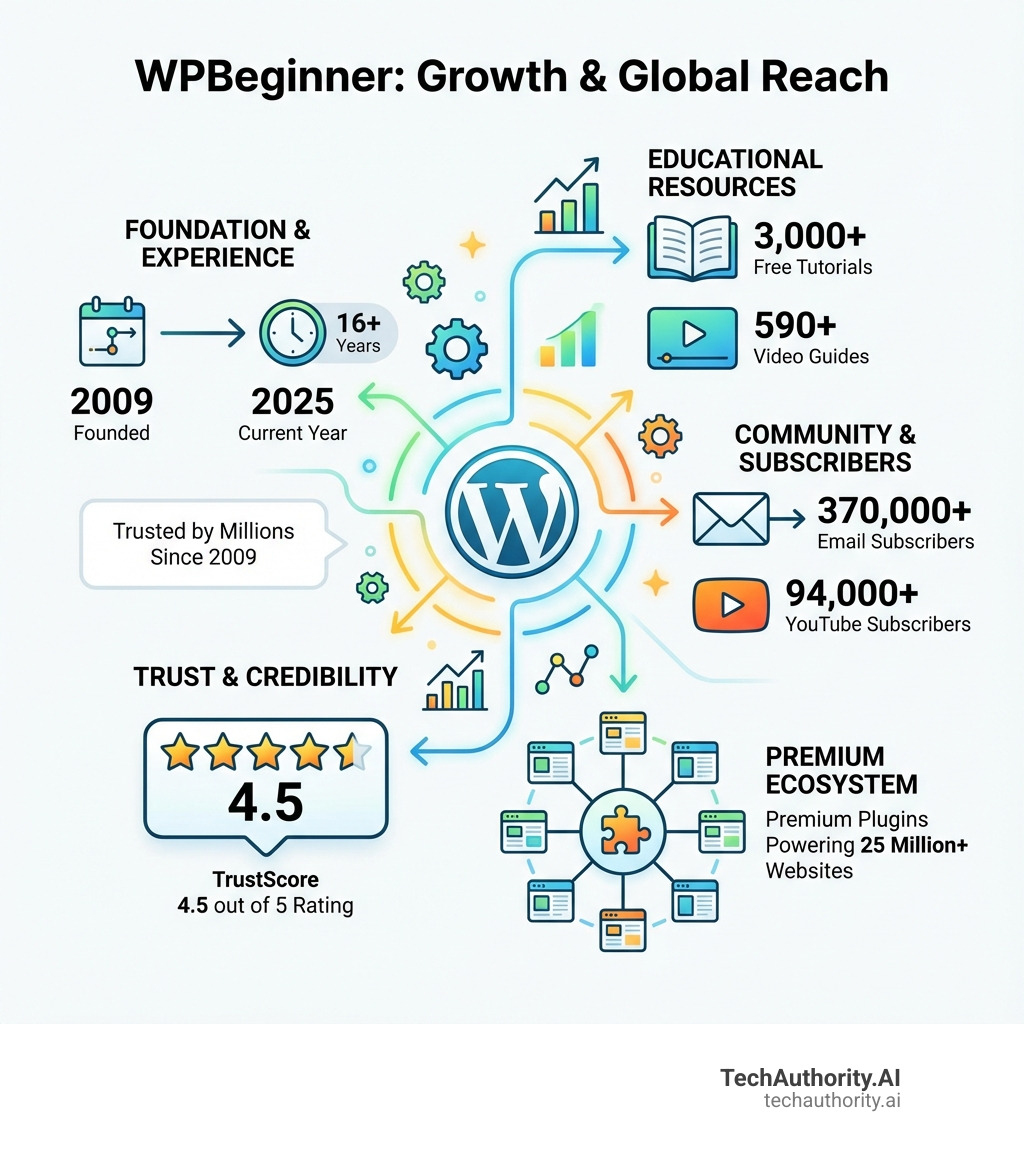
WP beginner is the largest free WordPress resource site on the internet, offering over 3,000 step-by-step tutorials, 590+ video guides, and a comprehensive WordPress dictionary—all designed to help non-technical users, small businesses, and bloggers build and manage their websites without confusion.
What You'll Find at WPBeginner:
- 3,000+ Free Tutorials – Step-by-step guides for every WordPress task
- 590+ Video Tutorials – Visual walkthroughs on the world's largest WordPress YouTube channel
- WordPress Dictionary – Tech terms explained in plain English
- Premium Plugins – Tools powering over 25 million websites (OptinMonster, WPForms, MonsterInsights)
- Active Community – 370,000+ email subscribers and a thriving Facebook group
- 16+ Years of Experience – Trusted by millions since 2009
Starting with WordPress can feel overwhelming. You know you want to build a website, but the learning curve seems steep. Where do you find reliable answers? Which plugins actually work? How do you fix that error message you've never seen before?
That's exactly why WPBeginner exists. Founded in 2009 by Syed Balkhi, the site was born from a simple frustration: there weren't enough easy-to-understand WordPress tutorials for people without technical backgrounds. Instead of jargon-heavy documentation, WPBeginner offers clear, practical guidance written specifically for people who are just getting started.
Today, WP beginner has grown into the most trusted name in WordPress education. With a 4.5 TrustScore and resources that power over 25 million websites, it's become the go-to destination for anyone who needs WordPress help—fast.
I'm Randy Speckman, founder of Randy Speckman Design, and over my career working with 500+ entrepreneurs and designing thousands of websites, I've consistently pointed clients toward wp beginner resources as the foundation for understanding WordPress. Whether you're building your first site or your fiftieth, this comprehensive guide will show you exactly how to leverage WPBeginner's ecosystem to go from complete novice to confident WordPress user.
The Genesis of a WordPress Giant: History and Mission
Every great resource starts with a clear vision, and WP beginner is no exception. It all began in 2009 when Syed Balkhi, a passionate entrepreneur with a deep understanding of WordPress, encountered a common frustration. He found himself constantly answering the same basic questions about WordPress for friends and clients. The existing documentation was often too technical, filled with jargon, and not easily digestible for someone without a coding background.
Syed's single goal was to “create WordPress tutorials that are easy to understand for non-techy users.” He envisioned a platform where beginners could find clear, step-by-step guidance without feeling overwhelmed. This mission quickly resonated with millions, laying the foundation for what would become the largest free WordPress resource site in the world.
From its humble beginnings, WP beginner has experienced incredible growth. With over 16 years of WordPress experience now under its belt, the platform has cultivated a stellar reputation within the WordPress community, boasting a TrustScore of 4.5 out of 5 based on numerous reviews. This growth isn't just about tutorials; it's about empowering individuals and small businesses to harness the power of WordPress without needing to become developers themselves. Today, WP beginner is managed by Awesome Motive, Syed Balkhi's larger company, which has expanded its reach to include a suite of highly successful premium WordPress products.

What Makes WPBeginner Unique?
What makes WP beginner‘s approach so unique? Our research and experience point to several key differentiators:
- Beginner-Focused Philosophy: WP beginner keeps its primary audience – the non-technical beginner – at the forefront of every piece of content. This means we're not just explaining what to do, but why and how in the simplest terms possible.
- Easy-to-Understand Language: Jargon is the enemy of the beginner. WP beginner prides itself on breaking down complex WordPress and tech terminology into plain English. It's like having a friendly, knowledgeable guide by your side, rather than a dense textbook.
- Comprehensive Guides: From setting up your very first site to optimizing it for speed and security, WP beginner offers end-to-end guidance. They don't just give you a snippet; they provide extensive, detailed guides that cover every angle of a topic.
- Free and Accessible Resources: The core of WP beginner‘s offering is its vast library of free tutorials and videos. This commitment to free education democratizes access to WordPress knowledge, making it possible for anyone, regardless of budget, to learn.
- Community-Driven Approach: WP beginner isn't just a website; it's a community. Through its active social media presence and forums, it fosters an environment where users can engage, ask questions, and learn from both experts and peers.
For those looking to dive deeper into the technical side, our own WordPress Guide for Developers can complement the foundational knowledge gained from WP beginner, offering a pathway for growth once the basics are mastered.
Common Questions It Solves
If you've ever found yourself staring at your screen, wondering “How can I do _ in WordPress?” or “Which WordPress plugin should I pick for doing __?”, you're not alone. These are the exact questions WP beginner was built to answer. The site acts as a problem-solver, anticipating the problems new WordPress users face.
Here are some of the most frequent questions and challenges that WP beginner helps us overcome:
- “How can I do ___ in WordPress?”: Whether it's adding a contact form, creating a new page, or embedding a video, WP beginner provides clear, actionable instructions. It's like having a step-by-step recipe for every WordPress task.
- “Which WordPress plugin should I pick for doing __?”: With tens of thousands of plugins available, choosing the right one can be daunting. WP beginner offers expert recommendations and comparisons, guiding us to the best tools for specific functionalities like SEO, security, or e-commerce.
- “How do I fix ____ WordPress error?”: The dreaded white screen of death or a database connection error can send chills down any beginner's spine. WP beginner provides detailed troubleshooting guides for common WordPress errors, helping us diagnose and resolve issues with confidence.
- “What are the best practices for doing ____ in WordPress?”: Beyond just “how-to,” WP beginner teaches us the “how-to-do-it-right.” This includes best practices for security, performance, SEO, and general site management, ensuring our websites are robust and effective.
For small businesses, these answers are invaluable. They translate directly into saving time, reducing costs, and building a more effective online presence. Our comprehensive WordPress Small Businesses Complete Guide further explores how these resources can be applied to grow your business.
Your Free WordPress University: A Tour of WPBeginner's Resources
Imagine having a university dedicated solely to teaching you WordPress, completely free, and always open. That's essentially what WP beginner offers. Its extensive collection of resources is carefully crafted to empower anyone to learn WordPress, solve problems, and build successful websites. The benefits of leveraging these resources are immense: we gain confidence, save money on costly developers for basic tasks, and develop a deeper understanding of our own online presence. It's about turning confusion into clarity and helplessness into empowerment.
The Core Resources for a WP Beginner
At the heart of WP beginner‘s offering are its foundational educational tools, designed to guide us through every aspect of WordPress:
- Over 3000+ free WordPress tutorials: This is the backbone of WP beginner. These are not just basic articles; they are comprehensive, step-by-step guides that walk us through everything from installing WordPress to advanced customization. Each tutorial is written with the non-techy user in mind, ensuring that even complex processes become manageable. Whether you're trying to add a new image gallery or set up a membership site, you'll likely find a detailed guide here.
- WordPress dictionary: Ever encountered a term like “permalink,” “shortcode,” or “widget” and felt completely lost? The free WordPress dictionary is a lifesaver. It explains WordPress and general tech terminology in plain English, helping us familiarize ourselves with the lingo without needing a computer science degree. It's an indispensable tool for bridging the knowledge gap.
- WPBeginner Blueprint: This offers a unique, behind-the-scenes look at the plugins, tools, and services that WP beginner itself uses to run its massive operation. It's like getting a peek under the hood of a successful WordPress site, providing practical insights and recommendations based on real-world application.
These core resources, combined with our own detailed WordPress Tutorials, form a powerful learning ecosystem that can take any beginner from zero to WordPress hero.
Mastering WordPress with Video Content
For many of us, visual learning is the most effective. Sometimes reading a step-by-step guide is great, but watching someone do it is even better. WP beginner understands this deeply, which is why their video content is a cornerstone of their educational offerings.
The WP beginner YouTube channel is truly a phenomenon. With over 590 video tutorials and an impressive 94,000+ subscribers, it proudly stands as the largest WordPress-focused YouTube channel in the world. This isn't just about quantity; it's about quality. Each week, new free video tutorials are produced, covering a vast array of topics, always with that signature easy-to-understand, step-by-step approach. From installing WordPress in under an hour to optimizing images for speed, these videos make complex tasks approachable and enjoyable.
Watching a WP beginner video feels like having a knowledgeable friend walk you through the process, pausing to explain every click and decision. This visual reinforcement is incredibly effective for beginners, helping to solidify understanding and build confidence. It’s perfect for those moments when a written guide just isn't quite clicking, or when you simply prefer to follow along visually.
We often find ourselves recommending these videos to our clients who are just starting out, as they provide an excellent complement to written guides and can significantly speed up the learning process. You can explore more insights and guides on our own WordPress for Beginners Blog to further improve your learning journey.
Popular “How-To” Guides
When you're first navigating WordPress, certain challenges pop up again and again. Thankfully, WP beginner has carefully crafted guides to tackle these universal pain points. These aren't just obscure tips; they're comprehensive solutions to the most common questions we all have.
Here are some of their most popular and invaluable “how-to” guides:
- How to Speed up Your WordPress Site: A slow website is a conversion killer. This guide dives into actionable strategies to boost your site's performance, from image optimization to caching, ensuring your visitors don't abandon your site out of impatience. We know how critical site speed is, and this resource is a fantastic starting point.
- How to Improve Your WordPress Security: Security is paramount. This guide provides essential steps to protect your WordPress site from hackers, malware, and other threats. It covers everything from strong passwords to security plugins, helping you lock down your digital assets.
- WordPress SEO Best Practices for Beginners: Getting found on Google is key to online success. This guide demystifies Search Engine Optimization (SEO), offering beginner-friendly advice on how to optimize your content and site structure to rank higher in search results.
- How to fix Common WordPress Errors: Every WordPress user, at some point, encounters an error. This guide is a troubleshooting bible, walking you through how to diagnose and resolve issues like the white screen of death, internal server errors, and connection problems.
These popular guides are more than just tutorials; they're essential tools for maintaining a healthy, secure, and performant WordPress website. For more advanced strategies on enhancing your site's efficiency, explore our comprehensive guide on WordPress Site Optimization.
Beyond Tutorials: The Awesome Motive Product Family
While WP beginner is renowned for its free, high-quality tutorials, its impact extends far beyond educational content. The team behind WP beginner, operating under the umbrella of Awesome Motive, has also developed a suite of premium WordPress products that are incredibly popular and powerful. These tools are designed to extend WordPress functionality, solve common business problems, and empower users to achieve even more with their websites. In fact, these premium WordPress plugins collectively power over 25 million websites worldwide, showcasing the team's deep expertise and commitment to creating solutions that truly work.
This expansion into premium products highlights the growth and evolution of WP beginner since its inception in 2009. What started as a mission to simplify WordPress has blossomed into a comprehensive ecosystem that not only educates but also equips users with the very best tools in the industry. It's a testament to their understanding of what WordPress users, especially beginners and small businesses, truly need to succeed online.
We often recommend these tools to our clients because they seamlessly integrate with WordPress and are built with the same user-friendly philosophy that defines WP beginner. For a broader look at essential development tools, check out our guide on Best WordPress Development Tools.
Essential Tools for Any WP Beginner
The Awesome Motive team has developed several industry-leading plugins that are often recommended by WP beginner itself. These tools address critical aspects of website functionality and marketing, making them indispensable for anyone serious about growing their online presence:
- OptinMonster: This is the world's most well-known conversion optimization software. OptinMonster helps us convert abandoning website visitors into subscribers and customers. It’s brilliant for building email lists, reducing cart abandonment, and increasing sales through targeted pop-ups, slide-ins, and other lead generation campaigns.
- WPForms: When you need a contact form, survey, or any other type of form on your WordPress site, WPForms is the answer. It's touted as the most beginner-friendly drag & drop form builder for WordPress, making it incredibly easy to create powerful forms without any code.
- MonsterInsights: Understanding your website traffic is crucial, but Google Analytics can be intimidating. MonsterInsights is the most downloaded Google Analytics solution for WordPress, making integration a breeze. It brings your analytics data right into your WordPress dashboard in an easy-to-understand format, helping you make data-driven decisions.
- WP Mail SMTP: Ever had issues with WordPress emails not being delivered? WP Mail SMTP is the most popular SMTP solution that helps us solve email deliverability issues. It ensures that all emails sent from your WordPress site (like contact form submissions, password resets, or e-commerce notifications) reliably reach their recipients.
These tools, born from the same understanding of user needs as WP beginner‘s tutorials, are powerful additions to any WordPress site. They empower us to handle crucial tasks like lead generation, data collection, analytics, and email communication with professional ease. For integrating these and other business tools, our guide on CRM Integration with WordPress offers further insights.
Engaging with the Community
Learning WordPress doesn't have to be a solitary journey. One of the greatest strengths of WP beginner is its vibrant and supportive community. Engaging with others who are on a similar path, or with experts who have been there, done that, can accelerate your learning, provide encouragement, and offer solutions to specific challenges.
WP beginner has cultivated multiple avenues for users to connect and interact, fostering a sense of belonging and shared progress. This community aspect is a huge benefit, as it allows us to ask questions, share experiences, and even celebrate small victories together.
The sheer scale of their community is impressive. WP beginner boasts over 370,000+ email list subscribers, a testament to the value they consistently deliver directly to inboxes. Beyond email, their presence on social media and dedicated forums creates active hubs for discussion and support.
How to Connect and Learn with Others
WP beginner makes it incredibly easy for us to engage with their content and community:
- WPBeginner Engage – WordPress help for non-techies!: This free Facebook group is a busy hub where WordPress experts and other motivated website creators connect. With over 4 million members, it's an incredible resource for asking questions, getting advice, and sharing your journey. It's a testament to the power of collective knowledge and support.
- Email List: Subscribing to their email list is a fantastic way to receive new tutorials, updates, and exclusive tips directly in your inbox. With over 370,000+ subscribers, it's a popular way to stay informed without actively searching the site.
- Social Media: You can join WP beginner on Twitter and Facebook to stay updated on their latest articles, videos, and news. These platforms offer another way to interact with their content and community members.
- YouTube Channel: As mentioned earlier, their YouTube channel is not just for watching tutorials; it's also a place for comments, questions, and discussions related to the video content.
These engagement channels are invaluable for ongoing learning and support. Leveraging them can significantly improve your WordPress experience, changing it from a solo quest into a collaborative adventure. For those interested in leveraging email for their WordPress site, our guide on Email Marketing for WordPress provides additional insights.
Frequently Asked Questions about WPBeginner
We often encounter common questions about WP beginner from those just finding its vast resources. Let's address some of the most frequently asked ones to provide even greater clarity.
Is WPBeginner really free?
Yes, the vast majority of resources offered by WP beginner are completely free. This includes their extensive library of over 3000 tutorials, more than 590 video guides on their YouTube channel, and their comprehensive WordPress dictionary. The founder, Syed Balkhi, has a strong belief that content should be 100% free, particularly for beginners who are just trying to get started without a huge upfront investment.
So, how do they sustain such a massive operation if everything is free? WP beginner operates on a sustainable business model. They generate revenue through their premium plugins (like OptinMonster, WPForms, MonsterInsights, etc., which we discussed earlier) and through referral fees from recommending trusted WordPress hosting providers and other services they genuinely use and believe in. This allows them to continue providing invaluable free content to the community without compromising on quality.
Is WPBeginner suitable for advanced users?
While its primary focus is on beginners, many tutorials on topics like security, performance, and SEO Optimization contain valuable information for intermediate and advanced users as well. Even seasoned WordPress professionals can benefit from their clear explanations of complex topics, or find new best practices they might have overlooked. For example, their detailed guides on optimizing WordPress for speed or hardening security often dig into technical specifics that are relevant to all skill levels. It's a testament to the depth and quality of their content that it can serve such a broad audience.
Who owns WPBeginner?
WP beginner was founded by Syed Balkhi in 2009. Over the years, as the site grew into the massive resource it is today, it became part of Awesome Motive, Syed Balkhi's larger company. Awesome Motive is a leading web software company that owns and manages a suite of popular WordPress plugins and other web resources, including OptinMonster, WPForms, MonsterInsights, and more. So, while Syed Balkhi is the founder and visionary behind WP beginner, the site is now managed and operated under the Awesome Motive umbrella.
Conclusion
Our journey through WP beginner has shown us just how invaluable this resource is for anyone looking to steer WordPress, from absolute novice to aspiring hero. What began as Syed Balkhi's simple mission to create easy-to-understand tutorials has blossomed into the largest free WordPress resource site globally, a true testament to the power of clear, accessible education.
We've seen how WP beginner demystifies complex topics, answers our most pressing questions, and equips us with the knowledge to build, manage, and optimize our websites. From its comprehensive library of over 3000 free tutorials and 590+ video guides to its essential premium tools like OptinMonster and WPForms, WP beginner provides a complete ecosystem for success. The vibrant community, spanning millions across Facebook, email, and social media, ensures that no one has to learn alone.
At TechAuthority.AI, we understand the challenges of mastering WordPress and growing an online business. That's why we consistently point our clients and readers toward trusted resources like WP beginner as a foundational step. By applying the knowledge gained from WP beginner‘s expert guides, you can confidently tackle WordPress, solve problems, and ultimately achieve your digital goals.
Ready to take your WordPress skills to the next level? Continue your learning journey with our expert guides and resources custom for entrepreneurs and agencies. Visit us at https://techauthority.ai/ to find how we can help you master WordPress and grow your online business.